
Placeholder Names
Often, when you’re creating a term, rule or list selector parent definition, you may realise that you’d like to include a term, which you haven’t yet defined. That’s not a problem with placeholder names.
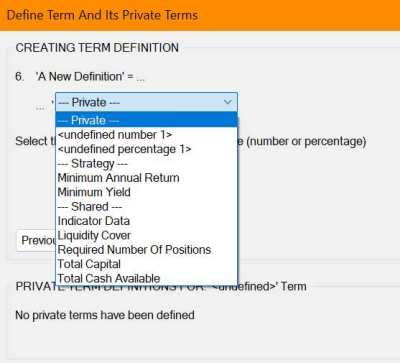
Just select the ‘named value [or named condition, security, or security list] term’ option in the DEfT Wizard, then on the next dialog of the Wizard you’ll be offered a list of already defined terms that are available to you. As you can see in the image above, at the top of this list are one or more (depending on context and type) placeholder terms, such as: ‘<undefined number X>’, ‘<undefined percentage Y>’, ‘<undefined condition Z>’, etc. where X, Y and Z are numbers used to make the names unique. Use these as the placeholder name for the term you want to create. Once you’ve selected a place-holder, if you want to use it again in the same definition, you’ll see it listed as ‘<number X>’, ‘<percentage Y>’, ‘<condition Z>’, etc. i.e. the ‘undefined’ has been removed implying the named term place-holder is in use.
Then, when you finish creating that definition, you’ll see a basic term definition is automatically created in the private terms area, with the placeholder name you selected. All you have to do now is edit that term, by giving it a meaningful name and selecting the correct term type for the context in which the place-holder term was used. Then define the term’s expression, whose value, state, security or security list the name will represent. When you finish the definition, you’ll find the placeholder name in the main definition has been automatically replaced with the new name you gave the Private Term.
If you want the term to be a Shared or Strategy Term rather than a Private Term, then simply cut and paste it into either of those tabs.
