
Channel Banding
To make it easy to locate prices relative to an AutoTrend price-channel, we provide two banding schemas: Named bands and Tenth Standard Deviation (TSD) bands. These divide the price-channels into bands, parallel to the trend line, that offer a simple way to both locate a price in a specified band, and to determine a price on a band boundary.
You can display either type of banding for any channel type (i.e. micro, short, medium or long) by configuring what is displayed in the Channel Style Settings. Also, either banding schema can be used in the constructs that provide channel data. TSD bands provide a more granular division of the channels but we prefer Named band because they provide an easy to remember reference scheme and discourage over-optimisation by using relatively broad bands.
Named Bands
The named bands schema is shown below. A name is given for each major band, which is then divided into two sub-bands: the inner and outer parts relative to the trend line. So the full name for a band might be e.g. Lower Turn Band (outer); or Upper Channel (inner).
The width of each band and the location of their edges can be set in AutoTrend Settings. Use the scheme’s band names to refer to the location of the price according to the band the price is in. Find prices levels in the channel by locating them using a band’s upper or lower edges. The turn-band is so named because most price-turns (i.e. peaks and troughs) should, ideally, land in or beyond these bands.
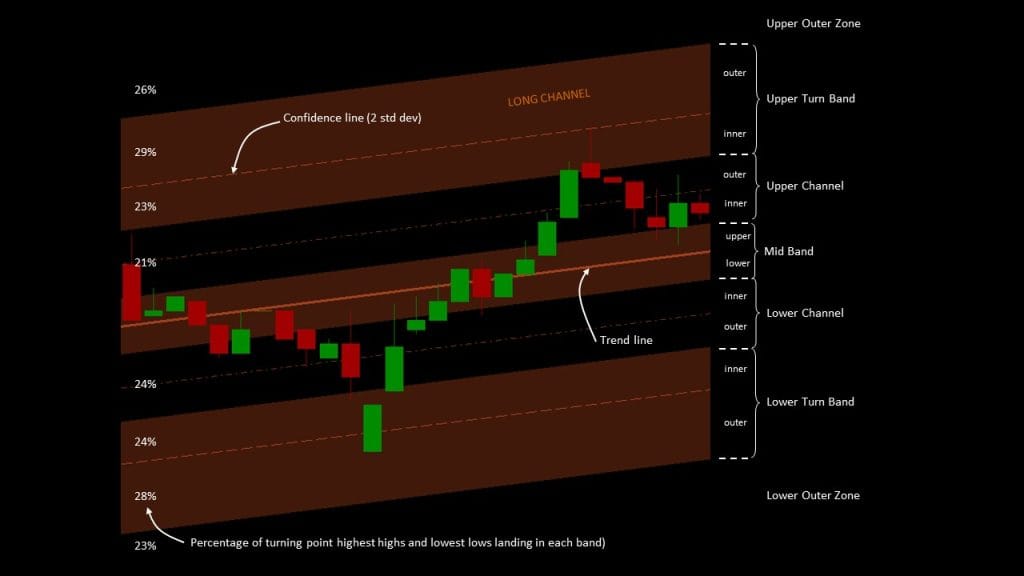
The percentages shown for each band indicate the percentage of highest high prices and lowest low prices that landed in each band in the upper and lower half of the channel, respectively. These values were derived from testing every share in the LSE Shares list over a period of nearly 10 years with a market cap > £25M and with a price volatility > 0 and < 25 (so most of the ‘junk’ shares have been removed). If you wish, you can repeat this exercise using the ‘Trend, Price Swing & Turning Point Analysis’ section of the Test Dashboard’s AutoTrend Settings dialog.
Tenth Standard Deviation (TSD) Bands
Rather than using named bands, TSD bands divide the channel into 1/10 standard deviation bands on either side of the trend line:

TSD bands are referenced by their index – the bands immediately on either side of the trend line are indexed +1 / -1 and count outwards from there, so band +20 would be between 1.9 – 2.0 standard deviations above the trend line. Bands below the trend line have an increasingly negative index, while those above are increasingly positive. Like named bands, you can refer to the location of a price based on the band that the price is in and you can find the price at a point defined by a band’s upper or lower edges.
Highest & Lowest Band Tracking
One of the features of the banding system is that it tracks the lowest and highest band, in the upper and lower side of the channel, that was reached by the lowest low, or highest high price. This is useful for testing if the price has been in some band, at some point in the recent past, and has then reversed sufficiently far from that extreme, so as to confirm the turning point.
Once a lowest or highest band is found, that band is remembered until the price moves to the other side of the channel and then moves back across the trend-line to the same side (i.e. it crosses the trend-line twice). At that point the tracker is reset and starts looking for the next lowest or highest band, respectively.
For example, if the highest named band reached by the highest high price is the +19 TSD band, then that will be remembered until the price has descended below the trend-line into the lower channel and then reversed and crossed back above the trend-line. The tracker then resets and starts looking again for the highest band that is encountered next.
