
Article Contents
Get Started Quickly
Reference Manual
- The Trading Specification
- Trading Spec Dialog & DEfT Wizard
- How A Trading Specification Is Executed
- Live Session Catch-up
- How Trading Rules Are Evaluated
- Introduction
- The Example System's Trading Universe
- The V&G Strategy's Trading List Selectors
- How The V&G Strategy Screens For Opportunities
- The V&G Strategy's Trading Rules
- The Momentum Strategy's Trading List Selectors
- How The Momentum Strategy Buys Shares
- How The Momentum Strategy Sells Shares
- The Example System's Shared Terms
Research & Articles
- The Example Investment System Explained
- Market Indicators and Trend Reports
- UK Market Direction, Phase and Rally Indicators
- Market Risk and Global Economy Indicators
- Guide To Risk, Returns And Trade-Sizing
- How RuleTrader's Smart Trade Sizing Works
- Back-Testing: Is It Worth It?
- List Sampling: Is It Worth It?
Trouble Shooting
Print
Create An Account
Clicking the Create button on the Dashboard’s Trading Account displays the Create Trading Account dialog:
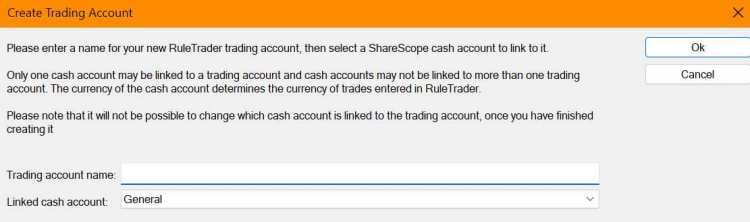
Enter the name of the account in this dialog and select the ShareScope cash account that will be linked to your trading account (see Live Account Integration With ShareScope). Once this is defined, it cannot be altered without first deleting then recreating the account. When you’re done, press Ok, and the Creating Trading Account dialog will be displayed.
