
Creating/Editing A Live Account’s Details
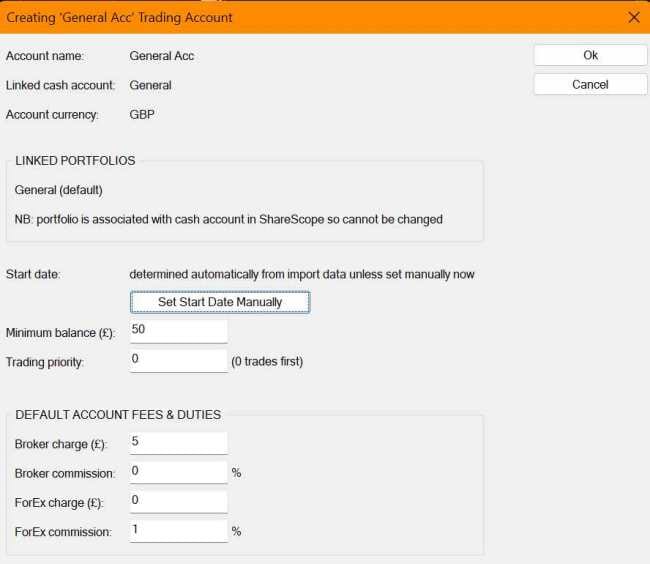
This dialog is displayed as part of the Live session trading account creation process, after you specify the new account’s name and linked cash-account in the Create Account dialog. It’s also shown when you click the View/Edit button on the Trading Account tab in the Dashboard dialog.
Here you’ll see the linked cash-account’s currency, which will be the currency of any trades entered in this trading account. If the cash-account is attached to a portfolio in ShareScope, then that portfolio will be displayed in the Linked Portfolios group and will be the only portfolio that can be linked to the trading account (see the topic Attach Cash Account in ShareScope’s Help). Otherwise you’ll be offered a drop-list of portfolios in ShareScope and can link one or more of these to your Trading Account. You can also break the cash-account attachment in ShareScope, then edit your trading account’s details later, to link more portfolios if you choose.
Below the Linked Portfolios group, the Start Date settings allow to specify whether you wish to calculate the start-date and opening balance for the account automatically, or enter a start-date yourself (see Live Account Integration With ShareScope).
Then there are a series of settings that can be defined or edited for the account:
- Minimum balance: This specifies the minimum amount that RuleTrader will leave in the account after making any trades. It ensures you have enough there to, for instance, pay any account charges levied by your broker
- Trading priority: When buying shares, RuleTrader uses cash, from each account you have defined, in order of their Trading Priority (lowest priority number goes first). If there is insufficient cash in one account, a part purchase is made with the remaining cash in that account, which is in excess of the minimum balance (provided it is greater than the Minimum Trade Value defined in the Trade Sizing tab). Cash is then used from the next account(s) in Trading Priority order, until the trade is completed.
- Broker charge / commission: Use these to enter default values for the amounts that your broker charges for a trade. They can be modified in the Trade Entry dialog, when you make a trade, if required
- ForEx charge / commission: Enter the default charges imposed by your broker if they have to convert the money to a foreign currency in order to buy a foreign share. Again these can be edited in the Trade Entry dialog.
