
Article Contents
Get Started Quickly
Reference Manual
- The Trading Specification
- Trading Spec Dialog & DEfT Wizard
- How A Trading Specification Is Executed
- Live Session Catch-up
- How Trading Rules Are Evaluated
- Introduction
- The Example System's Trading Universe
- The V&G Strategy's Trading List Selectors
- How The V&G Strategy Screens For Opportunities
- The V&G Strategy's Trading Rules
- The Momentum Strategy's Trading List Selectors
- How The Momentum Strategy Buys Shares
- How The Momentum Strategy Sells Shares
- The Example System's Shared Terms
Research & Articles
- The Example Investment System Explained
- Market Indicators and Trend Reports
- UK Market Direction, Phase and Rally Indicators
- Market Risk and Global Economy Indicators
- Guide To Risk, Returns And Trade-Sizing
- How RuleTrader's Smart Trade Sizing Works
- Back-Testing: Is It Worth It?
- List Sampling: Is It Worth It?
Trouble Shooting
Print
Rule Highlights
Rule Highlights provide a visual aid to immediately determine, from the chart, which Trading Rule was responsible for which trade. They display a colour-coded disk around the chart bar, when the trade occurred.
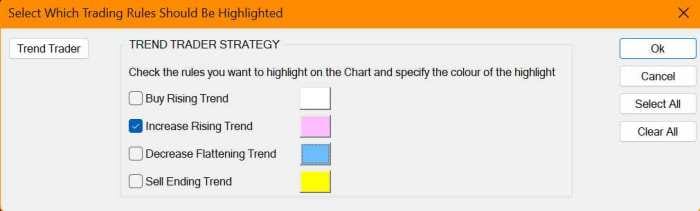
The Rule Highlights settings dialog is accessed from the Chart Settings dialog. Use it to specify which colour represents which rule. The buttons on the left of the dialog are used to select a trading strategy from the currently selected trading specification. Its trading rules are then display in the middle of the dialog, where you can select a colour for each rule. Check a rule to turn its highlights on.
